ashen-aetna-ko
잿빛 에트나 (Ashen Aetna)
— 재 덮인 화산 위에서 불안하게 더듬거리기
(3D 그래픽스, 러스트, 벌칸, 애쉬에 관한, 그 안에서의, 그것에 대한, 그것과 함께하는 튜토리얼)
스토리지 버퍼 (A storage buffer)
(이번 장의 제목에 대한 주제는 끝부분에서 다루겠습니다.)
몇 챕터마다 정리가 필요하다는 느낌이 듭니다 (물론, 미리 계획하지 않고 진행하면서 글을 쓰다 보니 생기는 인공적인 결과물이지만요). 이번에는 셰이더 프로그램에 있던 일부 설정들을 러스트 코드로 옮기고 싶습니다.
먼저, roughness와 metallic 값입니다. 이 값들을 색상과 함께 두는 것이 좋겠습니다. 즉, InstanceData에 새로운 필드를 추가해야 합니다.
#[repr(C)]
pub struct InstanceData {
    pub modelmatrix: [[f32; 4]; 4],
    pub inverse_modelmatrix: [[f32; 4]; 4],
    pub colour: [f32; 3],
    pub metallic: f32,
    pub roughness: f32,
}
impl InstanceData {
    pub fn from_matrix_colour_metallic_and_roughness(
        modelmatrix: na::Matrix4<f32>,
        colour: [f32; 3],
        metallic: f32,
        roughness: f32,
    ) -> InstanceData {
        InstanceData {
            modelmatrix: modelmatrix.into(),
            inverse_modelmatrix: modelmatrix.try_inverse().unwrap().into(),
            colour,
            metallic,
            roughness,
        }
    }
}
그러면 우리 씬의 구체는 당연히 다음과 같이 생성되어야 합니다.
    sphere.insert_visibly(InstanceData::from_matrix_colour_metallic_and_roughness(
        na::Matrix4::new_scaling(0.5),
        [0.955, 0.638, 0.538],
        1.0,
        0.2
    ));
또한 (파이프라인 생성 시의) VertexAttributeInputDescriptions도 업데이트해야 합니다 (어떻게든 이 데이터를 프래그먼트 셰이더로 전달해야 하니까요).
             vk::VertexInputAttributeDescription {
                binding: 1,
                location: 11,
                offset: 140,
                format: vk::Format::R32_SFLOAT,
            },
             vk::VertexInputAttributeDescription {
                binding: 1,
                location: 12,
                offset: 144,
                format: vk::Format::R32_SFLOAT,
            },

        ];
        let vertex_binding_descs = [
            vk::VertexInputBindingDescription {
                binding: 0,
                stride: 24,
                input_rate: vk::VertexInputRate::VERTEX,
            },
            vk::VertexInputBindingDescription {
                binding: 1,
                stride: 148,
                input_rate: vk::VertexInputRate::INSTANCE,
            },
        ];
(InputBindingDescription의 input_rate도 업데이트되었습니다.)
정점 셰이더에서는 새로운 값들을 받습니다.
layout (location=11) in float metallic_in;
layout (location=12) in float roughness_in;
이 값들을 프래그먼트 셰이더로 그냥 넘겨주겠다는 의도를 선언합니다.
layout (location=4) out float metallic;
layout (location=5) out float roughness;
그리고 그렇게 합니다.
    metallic=metallic_in;
    roughness=roughness_in;
그 다음 프래그먼트 셰이더에서 이 값들을 받습니다.
layout (location=4) in float metallic;
layout (location=5) in float roughness;
이제 이전의 정의를 제거할 수 있습니다.
//	float metallic = 1.0;
//	float roughness = 0.5;
그리고 다음과 같은 오류 메시지를 받게 됩니다.
shader.frag:47: error: 'assign' : l-value required "roughness" (can't modify shader input)
이 줄 때문입니다.
roughness=roughness*roughness;
아마도 이제 다른 이름으로 불러야 할 것 같습니다.
float roughness2=roughness*roughness;
(그리고 layout ... in 줄을 제외한 다른 roughness의 사용도 roughness2로 변경합니다.)
다른 값들의 결과를 확인하기 위해 설정을 변경해 봅시다.
    for i in 0..10 {
        for j in 0..10 {
            sphere.insert_visibly(InstanceData::from_matrix_colour_metallic_and_roughness(
                na::Matrix4::new_translation(&na::Vector3::new(i as f32 - 5., j as f32 + 5., 10.0))
                    * na::Matrix4::new_scaling(0.5),
                [0., 0., 0.8],
                i as f32 * 0.1,
                j as f32 * 0.1,
            ));
        }
    }
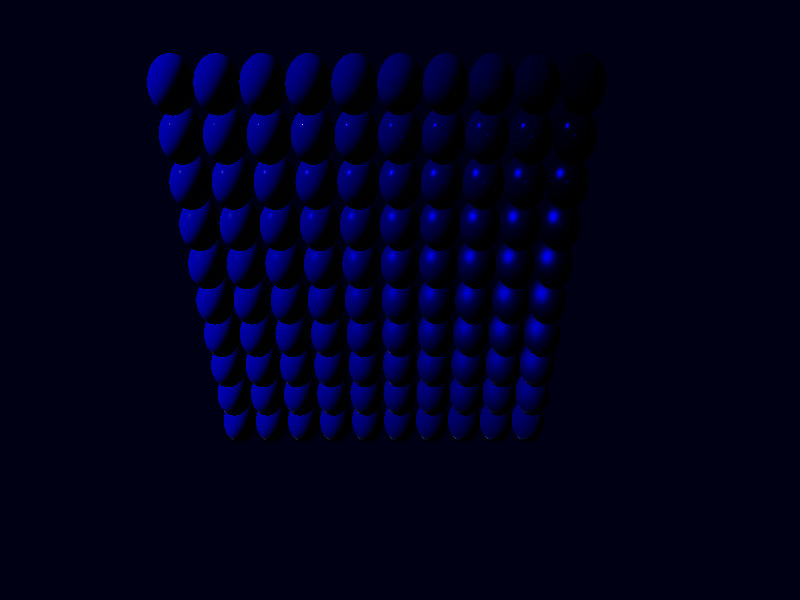
이 이미지는 위쪽은 roughness가 0이고 아래로 갈수록 1이 됩니다 (표면이 매끄러울수록 반사 하이라이트가 작아져서 알아볼 수 있습니다). metallic은 왼쪽에서 오른쪽으로 갈수록 증가합니다. (0이나 1에 가깝지 않은 metallic 값은 보통 피해야 합니다. metallic=0.9에 대해서는, 픽셀의 10%를 먼지가 덮고 있는 금속이라고 생각할 수 있습니다.)
조명 상황이 최적이 아닐 수도 있습니다.
조명 얘기가 나왔으니 말인데, 조명 데이터도 프로그램에서 가져올 수 있을까요?
조명은 확실히 정점의 일부가 아닙니다. 아마도 카메라 정보처럼 또 다른 유니폼 버퍼를 구성해야 할 것입니다.
또한 프로그램에서 조명을 표현할 수 있도록 해야 합니다. 먼저 light.rs라는 새 파일을 만들어 PointLight와 DirectionalLight를 정의하고, 모든 조명을 모아둘 LightManager라는 공간을 만들어 봅시다 (끔찍하게 즉흥적이고 제대로 설계되지 않은 구조로 말이죠).
use nalgebra as na;

pub struct DirectionalLight {
    pub direction: na::Vector3<f32>,
    pub illuminance: [f32; 3], //단위: lx = lm/m^2
}

pub struct PointLight {
    pub position: na::Point3<f32>, //단위: m
    pub luminous_flux: [f32; 3],   //단위: lm
}

pub enum Light {
    Directional(DirectionalLight),
    Point(PointLight),
}

impl From<PointLight> for Light {
    fn from(p: PointLight) -> Self {
        Light::Point(p)
    }
}

impl From<DirectionalLight> for Light {
    fn from(d: DirectionalLight) -> Self {
        Light::Directional(d)
    }
}

pub struct LightManager {
    directional_lights: Vec<DirectionalLight>,
    point_lights: Vec<PointLight>,
}

impl Default for LightManager {
    fn default() -> Self {
        LightManager {
            directional_lights: vec![],
            point_lights: vec![],
        }
    }
}

impl LightManager {
    pub fn add_light<T: Into<Light>>(&mut self, l: T) {
        use Light::*;
        match l.into() {
            Directional(dl) => {
                self.directional_lights.push(dl);
            }
            Point(pl) => {
                self.point_lights.push(pl);
            }
        }
    }
}
main.rs에서 (현재 프래그먼트 셰이더에 정의된 것과 일치하는) 몇 개의 조명을 생성합니다.
    let mut lights = LightManager::default();
    lights.add_light(DirectionalLight {
        direction: na::Vector3::new(-1., -1., 0.),
        illuminance: [10.1, 10.1, 10.1],
    });
    lights.add_light(PointLight {
        position: na::Point3::new(0.1, -3.0, -3.0),
        luminous_flux: [100.0, 100.0, 100.0],
    });
    lights.add_light(PointLight {
        position: na::Point3::new(1.5, 0.0, 0.0),
        luminous_flux: [10.0, 10.0, 10.0],
    });
    lights.add_light(PointLight {
        position: na::Point3::new(1.5, 0.2, 0.0),
        luminous_flux: [5.0, 5.0, 5.0],
    });
물론 mod light;와 use crate::light::{DirectionalLight, LightManager, PointLight};를 추가해야 합니다.
더 나아가, LightManager에 모든 데이터를 버퍼에 넣는 함수를 추가합니다. 먼저 각 종류별 조명의 개수를 넣고, 그 다음에 실제 데이터(방향과 조도 또는 위치와 광속)를 넣습니다.
    pub fn update_buffer(
        &self,
        allocator: &vk_mem::Allocator,
        buffer: &mut Buffer,
    ) -> Result<(), vk_mem::error::Error> {
       let mut data: Vec<f32> = vec![];
        data.push(self.directional_lights.len() as f32);
        data.push(self.point_lights.len() as f32);
        for dl in &self.directional_lights {
            data.push(dl.direction.x);
            data.push(dl.direction.y);
            data.push(dl.direction.z);
            data.push(dl.illuminance[0]);
            data.push(dl.illuminance[1]);
            data.push(dl.illuminance[2]);
        }
        for pl in &self.point_lights {
            data.push(pl.position.x);
            data.push(pl.position.y);
            data.push(pl.position.z);
            data.push(pl.luminous_flux[0]);
            data.push(pl.luminous_flux[1]);
            data.push(pl.luminous_flux[2]);
        }
        buffer.fill(allocator, &data)?;
        Ok(())
    }
이제 이 정보들을 저장하기 위해, Aetna에 uniformbuffer와 같은 새로운 필드를 만듭니다.
pub lightbuffer: Buffer,
그리고 초기화 시에 생성하고 채웁니다 (초기화 시에는 방향성 조명 0개, 점 광원 0개로 채웁니다).
        let mut lightbuffer = Buffer::new(
            &allocator,
            8,
            vk::BufferUsageFlags::UNIFORM_BUFFER,
            vk_mem::MemoryUsage::CpuToGpu,
        )?;
        lightbuffer.fill(&allocator, &[0.,0.])?;
또한 Aetna::drop()에 버퍼 파괴 코드를 하나 더 추가해야 합니다.
            self.allocator
                .destroy_buffer(self.lightbuffer.buffer, &self.lightbuffer.allocation)
                .expect("buffer destruction");
프래그먼트 셰이더에는 유니폼 버퍼 객체를 포함시킵니다.
layout (set=1, binding=0) uniform UniformBufferObject {
	float num_directional;
	float num_point;
} ubo;
(이게 최종 형태는 아니지만, 우리가 이미 가지고 있는 두 개의 숫자를 포함하고 있습니다.)
테스트 목적으로, 프래그먼트 셰이더의 main() 끝에 다음 줄들을 삽입합니다.
	if (ubo.num_directional==0.0){
		theColour=vec4(1.0,0.0,0.0,1.0);
	}
	if (ubo.num_directional==1.0){
		theColour=vec4(1.0,1.0,0.0,1.0);
	}
이 코드들은 구체의 색상에 대한 우리의 모든 작업을 망치지만, 셰이더가 우리가 보낸 데이터를 받았는지 명확하게 확인하는 데 도움이 됩니다.
데이터를 보내기 위해, 또 다른 유니폼 버퍼를 준비합시다.
파이프라인 생성 시 (첫 번째 부분은 이름 변경을 제외하고는 이미 있었고, 두 번째 부분은 이름과 셰이더 스테이지를 제외하고는 동일하지만 새로 추가되었습니다).
        let descriptorset_layout_binding_descs0 =
            [vk::DescriptorSetLayoutBinding::builder()
                .binding(0)
                .descriptor_type(vk::DescriptorType::UNIFORM_BUFFER)
                .descriptor_count(1)
                .stage_flags(vk::ShaderStageFlags::VERTEX)
                .build()];
        let descriptorset_layout_info0 = vk::DescriptorSetLayoutCreateInfo::builder()
            .bindings(&descriptorset_layout_binding_descs0);
        let descriptorsetlayout0 = unsafe {
            logical_device.create_descriptor_set_layout(&descriptorset_layout_info0, None)
        }?;
        let descriptorset_layout_binding_descs1 = [vk::DescriptorSetLayoutBinding::builder()
            .binding(0)
            .descriptor_type(vk::DescriptorType::UNIFORM_BUFFER)
            .descriptor_count(1)
            .stage_flags(vk::ShaderStageFlags::FRAGMENT)
            .build()];
        let descriptorset_layout_info1 = vk::DescriptorSetLayoutCreateInfo::builder()
            .bindings(&descriptorset_layout_binding_descs1);
        let descriptorsetlayout1 = unsafe {
            logical_device.create_descriptor_set_layout(&descriptorset_layout_info1, None)
        }?;

        let desclayouts = vec![descriptorsetlayout0, descriptorsetlayout1];
그리고 Aetna는 descriptor_sets를 대체할 새로운 필드를 갖게 됩니다.
    descriptor_sets_camera: Vec<vk::DescriptorSet>,
    descriptor_sets_light: Vec<vk::DescriptorSet>,
다시 한번, 카메라 부분은 새로운 이름을 얻고, 조명 부분은 거의 복사본입니다.
        let pool_sizes = [vk::DescriptorPoolSize {
            ty: vk::DescriptorType::UNIFORM_BUFFER,
            descriptor_count: 2 * swapchain.amount_of_images, //
        }];
        let descriptor_pool_info = vk::DescriptorPoolCreateInfo::builder()
            .max_sets(2 * swapchain.amount_of_images) //
            .pool_sizes(&pool_sizes);
        let descriptor_pool =
            unsafe { logical_device.create_descriptor_pool(&descriptor_pool_info, None) }?;

        let desc_layouts_camera =
            vec![pipeline.descriptor_set_layouts[0]; swapchain.amount_of_images as usize];
        let descriptor_set_allocate_info_camera = vk::DescriptorSetAllocateInfo::builder()
            .descriptor_pool(descriptor_pool)
            .set_layouts(&desc_layouts_camera);
        let descriptor_sets_camera = unsafe {
            logical_device.allocate_descriptor_sets(&descriptor_set_allocate_info_camera)
        }?;

        for descset in &descriptor_sets_camera {
            let buffer_infos = [vk::DescriptorBufferInfo {
                buffer: uniformbuffer.buffer,
                offset: 0,
                range: 128,
            }];
            let desc_sets_write = [vk::WriteDescriptorSet::builder()
                .dst_set(*descset)
                .dst_binding(0)
                .descriptor_type(vk::DescriptorType::UNIFORM_BUFFER)
                .buffer_info(&buffer_infos)
                .build()];
            unsafe { logical_device.update_descriptor_sets(&desc_sets_write, &[]) };
        }
        let desc_layouts_light =
            vec![pipeline.descriptor_set_layouts[1]; swapchain.amount_of_images as usize];
        let descriptor_set_allocate_info_light = vk::DescriptorSetAllocateInfo::builder()
            .descriptor_pool(descriptor_pool)
            .set_layouts(&desc_layouts_light);
        let descriptor_sets_light = unsafe {
            logical_device.allocate_descriptor_sets(&descriptor_set_allocate_info_light)
        }?;

        for descset in &descriptor_sets_light {
            let buffer_infos = [vk::DescriptorBufferInfo {
                buffer: lightbuffer.buffer,
                offset: 0,
                range: 8,
            }];
            let desc_sets_write = [vk::WriteDescriptorSet::builder()
                .dst_set(*descset)
                .dst_binding(0)
                .descriptor_type(vk::DescriptorType::UNIFORM_BUFFER)
                .buffer_info(&buffer_infos)
                .build()];
            unsafe { logical_device.update_descriptor_sets(&desc_sets_write, &[]) };
        }
Aetna::update_commandbuffer()에서 카메라와 조명에 대한 디스크립터 셋을 모두 바인딩합니다.
            self.device.cmd_bind_descriptor_sets(
                commandbuffer,
                vk::PipelineBindPoint::GRAPHICS,
                self.pipeline.layout,
                0,
                &[
                    self.descriptor_sets_camera[index],
                    self.descriptor_sets_light[index],
                ],
                &[],
            );
… 그리고 모든 구체가 빨갛게 변합니다. 좋습니다. 이제 lightbuffer에 실제 데이터를 채워봅시다.
lights.update_buffer(&aetna.allocator, &mut aetna.lightbuffer)?;
(모든 add_lights 명령 바로 뒤에). 이제 구체들이 노랗게 변합니다 (좋습니다. 이제 방향성 조명이 하나 있으니까요). 하지만:
[Debug][error][validation] "VkDescriptorSet 0x2b000000002b[] bound as set #1 encountered the following validation error at vkCmdDrawIndexed()
time: Descriptor in binding #0 index 0 is using buffer VkBuffer 0x260000000026[] that is invalid or has been destroyed."
버퍼를 업데이트할 때, 우리는 버퍼의 크기보다 더 많은 바이트를 쓰려고 했고, 그래서 버퍼를 파괴하고 새 것을 만들었습니다. 우리의 Buffer::fill() 함수를 비교해 보세요.
    pub fn fill<T: Sized>(
        &mut self,
        allocator: &vk_mem::Allocator,
        data: &[T],
    ) -> Result<(), vk_mem::error::Error> {
        let bytes_to_write = (data.len() * std::mem::size_of::<T>()) as u64;
        if bytes_to_write > self.size_in_bytes {
            allocator.destroy_buffer(self.buffer, &self.allocation)?;
            let newbuffer = Buffer::new(
                allocator,
                bytes_to_write,
                self.buffer_usage,
                self.memory_usage,
            )?;
            *self = newbuffer;
        }
        let data_ptr = allocator.map_memory(&self.allocation)? as *mut T;
        unsafe { data_ptr.copy_from_nonoverlapping(data.as_ptr(), data.len()) };
        allocator.unmap_memory(&self.allocation)?;
        Ok(())
    }
하지만 디스크립터 셋은 여전히 이전 버퍼를 사용하라고 되어 있었습니다.
update_buffer 함수를 변경하여 이 문제를 해결합시다.
    pub fn update_buffer(
        &self,
        logical_device: &ash::Device,
        allocator: &vk_mem::Allocator,
        buffer: &mut Buffer,
        descriptor_sets_light: &mut [vk::DescriptorSet],
    ) -> Result<(), vk_mem::error::Error> {
        let mut data: Vec<f32> = vec![];
        data.push(self.directional_lights.len() as f32);
        data.push(self.point_lights.len() as f32);
        for dl in &self.directional_lights {
            data.push(dl.direction.x);
            data.push(dl.direction.y);
            data.push(dl.direction.z);
            data.push(dl.illuminance[0]);
            data.push(dl.illuminance[1]);
            data.push(dl.illuminance[2]);
        }
        for pl in &self.point_lights {
            data.push(pl.position.x);
            data.push(pl.position.y);
            data.push(pl.position.z);
            data.push(pl.luminous_flux[0]);
            data.push(pl.luminous_flux[1]);
            data.push(pl.luminous_flux[2]);
        }
        buffer.fill(allocator, &data)?;
        for descset in descriptor_sets_light {
            let buffer_infos = [vk::DescriptorBufferInfo {
                buffer: buffer.buffer,
                offset: 0,
                range: 4 * data.len() as u64,
            }];
            let desc_sets_write = [vk::WriteDescriptorSet::builder()
                .dst_set(*descset)
                .dst_binding(0)
                .descriptor_type(vk::DescriptorType::UNIFORM_BUFFER)
                .buffer_info(&buffer_infos)
                .build()];
            unsafe { logical_device.update_descriptor_sets(&desc_sets_write, &[]) };
        }

        Ok(())
    }
이런 식으로 우리는 항상 최신 버퍼를 사용하게 되고, 크기도 수정됩니다. (가능한 개선점은 필요할 때만 디스크립터 셋을 업데이트하는 것이지만, 여기서는 그렇게 하지 않습니다.)
이것으로 오류 메시지는 해결되었습니다.
이제 유니폼에서 더 많은 데이터를 읽어올 시간입니다.
layout (set=1, binding=0) uniform UniformBufferObject {
	float num_directional;
	float num_point;
	vec3 data[];
} ubo;
(data[]가 있는 줄은 새로 추가된 것으로, 크기가 지정되지 않은 배열입니다.)
그리고 main의 끝에, 다시 테스트 목적으로, 하지만 그 외에는 다소 의미 없는 코드를 추가합니다.
	theColour=vec4(vec3(0.0),1.0);
	for (int i=0;i<ubo.num_directional;i++){
		vec3 data1=ubo.data[2+3*i];
		theColour+=vec4(data1,0.0);
	}
이것은… 또 다른 오류를 발생시킵니다.
/shaders/shader.frag:103: error: '[' : array must be redeclared with a size before being indexed with a variable
배열의 크기와 사용할 인덱스가 모두 미지수이거나 변수일 수는 없습니다. 이건 좋지 않습니다. 우리는 고려할 조명의 최대 개수를 정할 수도 있습니다 (그렇게 하면 처음에 하나의 버퍼를 만들고, 변경하거나 디스크립터 셋을 바꾸지 않고 사용할 수 있게 됩니다). 하지만 다른 방법이 있을까요?
있습니다. 유니폼 버퍼를 사용하지 않고, 대신 스토리지 버퍼를 사용합니다.
 layout (set=1, binding=0) buffer UniformBufferObject {
	float num_directional;
	float num_point;
	vec3 data[];
} ubo;
검증 레이어에서 두 개의 메시지가 나타납니다.
[Debug][error][validation] "Shader requires fragmentStoresAndAtomics but is not enabled on the device"
[Debug][error][validation] "Type mismatch on descriptor slot 1.0 (expected `VK_DESCRIPTOR_TYPE_STORAGE_BUFFER, VK_DESCRIPTOR_TYPE_STORAGE_BUFFER_DYNAMIC`) but descriptor of type V
K_DESCRIPTOR_TYPE_UNIFORM_BUFFER"
우리는 여전히 코드 전반에 걸쳐 “유니폼 버퍼”라고 말하고 있으며 (이것을 변경해야 합니다), 특별한 장치 확장이 활성화되어야 합니다. 이 확장은 버퍼에 읽고 쓰기를 원할 때 필요하지만, 우리는 그렇게 하지 않을 것입니다. readonly 한정자를 삽입하여 그렇게 하지 않겠다고 약속할 수 있습니다.
readonly layout (set=1, binding=0) buffer UniformBufferObject {
	float num_directional;
	float num_point;
	vec3 data[];
} ubo;
이것으로 첫 번째 오류 메시지가 사라집니다.
두 번째 오류에 대해서는, 일부 vk::DescriptorType::UNIFORM_BUFFER를 vk::DescriptorType::STORAGE_BUFFER로 교체합니다.
파이프라인 생성 시 descriptorset_layout_binding_descs1의 정의에서, LightManager::update_buffer()에서, 그리고 Aetna::init()에서 교체합니다. Aetna::init()에서는 디스크립터 풀이 이 유형의 디스크립터를 위한 공간을 갖도록 보장합니다.
        let pool_sizes = [
            vk::DescriptorPoolSize {
                ty: vk::DescriptorType::UNIFORM_BUFFER,
                descriptor_count: swapchain.amount_of_images,
            },
            vk::DescriptorPoolSize {
                ty: vk::DescriptorType::STORAGE_BUFFER,
                descriptor_count: swapchain.amount_of_images,
            },
        ];
좋습니다, 얼마나 잘 작동하는지 봅시다. 우리의 첫 번째 (그리고 유일한) 방향성 조명을 변경합니다.
    lights.add_light(DirectionalLight {
        //     direction: na::Vector3::new(-1., -1., 0.),
        direction: na::Vector3::new(0., 1., 0.),
        illuminance: [10.1, 10.1, 10.1],
    });
그리고 프래그먼트 셰이더의 끝에서 시도해 봅니다.
	theColour=vec4(vec3(0.0),1.0);
	for (int i=0;i<ubo.num_directional;i++){
		vec3 data1=sbo.data[2*i];
		vec3 data2=sbo.data[2*i+1];
		theColour+=vec4(data1,0.0);
	}
이러면 초록색 공이 나와야겠죠? 그렇지 않습니다. 오히려 청록색(cyan)으로 보입니다.
순서가 틀렸을까요? 조도 값을 읽고 있는 걸까요? 시도해 봅시다.
    lights.add_light(DirectionalLight {
        //     direction: na::Vector3::new(-1., -1., 0.),
        direction: na::Vector3::new(0., 1., 0.),
        //illuminance: [10.1, 10.1, 10.1],
        illuminance: [0.0, 1.0, 0.0],
    });
파란색!?
이건 어떨까요?
    lights.add_light(DirectionalLight {
        //     direction: na::Vector3::new(-1., -1., 0.),
        direction: na::Vector3::new(0., 0., 1.),
        //illuminance: [10.1, 10.1, 10.1],
        illuminance: [0.0, 1.0, 0.0],
    });
분홍색.
    lights.add_light(DirectionalLight {
        //     direction: na::Vector3::new(-1., -1., 0.),
        direction: na::Vector3::new(0., 0., 1.),
        //illuminance: [10.1, 10.1, 10.1],
        illuminance: [1.0, 0.0, 0.0],
    });
노란색.
첫 번째 벡터의 마지막 성분과 두 번째 벡터의 처음 두 성분을 사용하고 있는 것 같습니다. 무슨 일일까요?
버퍼에서 변수를 꺼내오려면, 변수들이 올바르게 정렬(aligned)되어야 합니다. 임의의 위치에서 시작할 수 없습니다. 각 float는 4바이트 크기이며 바이트 0, 4, 8 등에서 시작할 수 있습니다. 이것은 문제가 아닙니다. 우리는 4바이트 크기의 값들을 연달아 넣었고, 이 4바이트 배수에 정렬된 4바이트 크기의 값들을 가져오려고 시도했습니다.
하지만, vec3는 단지 “세 개의 float가 연달아 있는 것”이 아니라, 벌칸 사양에 따르면 4개의 float에 해당하는 정렬(alignment)을 가집니다:
“3성분 또는 4성분 벡터는 스칼라 정렬의 4배에 해당하는 기본 정렬을 가집니다.”
이는 즉, 우리가 버퍼의 시작 부분에 두 개의 float만 저장하더라도(위치 0과 1, 또는 바이트 단위로 세는 것을 선호한다면 0과 4), 우리 데이터 값의 첫 번째 가능한 위치는 위치 4(바이트로는 16)라는 것을 의미합니다. 따라서 방향 벡터의 처음 두 성분은 무시됩니다.
이제 두 개의 float가 무시될 것이라는 것을 알았으니, 우리가 필요 없는 두 개의 float가 있도록 확실히 하면 됩니다: 길이 뒤에 data.push(0.0);를 두 번, 각 vec3 뒤에 한 번씩 추가합니다.
    pub fn update_buffer(
        &self,
        logical_device: &ash::Device,
        allocator: &vk_mem::Allocator,
        buffer: &mut Buffer,
        descriptor_sets_light: &mut [vk::DescriptorSet],
    ) -> Result<(), vk_mem::error::Error> {
        let mut data: Vec<f32> = vec![];
        data.push(self.directional_lights.len() as f32);
        data.push(self.point_lights.len() as f32);
        data.push(0.0);
        data.push(0.0);
        for dl in &self.directional_lights {
            data.push(dl.direction.x);
            data.push(dl.direction.y);
            data.push(dl.direction.z);
            data.push(0.0);
            data.push(dl.illuminance[0]);
            data.push(dl.illuminance[1]);
            data.push(dl.illuminance[2]);
            data.push(0.0);
        }
        for pl in &self.point_lights {
            data.push(pl.position.x);
            data.push(pl.position.y);
            data.push(pl.position.z);
            data.push(0.0);
            data.push(pl.luminous_flux[0]);
            data.push(pl.luminous_flux[1]);
            data.push(pl.luminous_flux[2]);
            data.push(0.0);
        }
        buffer.fill(allocator, &data)?;
        for descset in descriptor_sets_light {
            let buffer_infos = [vk::DescriptorBufferInfo {
                buffer: buffer.buffer,
                offset: 0,
                range: 4 * data.len() as u64,
            }];
            let desc_sets_write = [vk::WriteDescriptorSet::builder()
                .dst_set(*descset)
                .dst_binding(0)
                .descriptor_type(vk::DescriptorType::STORAGE_BUFFER)
                .buffer_info(&buffer_infos)
                .build()];
            unsafe { logical_device.update_descriptor_sets(&desc_sets_write, &[]) };
        }
        Ok(())
    }
이제 훨씬 낫네요.
이제 버퍼의 내용을 우리 조명의 값으로 사용할 수 있습니다 (셰이더 코드에 작성된 값 대신). 그리고 셰이더의 main()에 있던 “디버깅” 기능을 제거할 수 있습니다.
void main(){
	vec3 L=vec3(0);
	vec3 direction_to_camera = normalize(camera_coordinates - worldpos);
	vec3 normal = normalize(normal);

	int number_directional=int(ubo.num_directional);
	int number_point=int(ubo.num_point);

	for (int i=0;i<number_directional;i++){
		vec3 data1=ubo.data[2*i];
		vec3 data2=ubo.data[2*i+1];
		DirectionalLight dlight = DirectionalLight(normalize(data1),data2);

		L += compute_radiance(dlight.irradiance, dlight.direction_to_light, normal, direction_to_camera, colour_in);
	}

	for (int i=0;i<number_point;i++){
		vec3 data1=ubo.data[2*i+2*number_directional];
		vec3 data2=ubo.data[2*i+1+2*number_directional];
		PointLight light = PointLight(data1,data2);
		vec3 direction_to_light = normalize(light.position - worldpos);
		float d = length(worldpos - light.position);
		vec3 irradiance = light.luminous_flux/(4*PI*d*d);

		L += compute_radiance(irradiance, direction_to_light, normal, direction_to_camera, colour_in);
	}

	theColour=vec4(L/(1+L),1.0);
}
이러한 조명들로:
    let mut lights = LightManager::default();
    lights.add_light(DirectionalLight {
        direction: na::Vector3::new(-1., -1., 0.),
        illuminance: [10.1, 10.1, 10.1],
    });
    lights.add_light(PointLight {
        position: na::Point3::new(0.1, -3.0, -3.0),
        luminous_flux: [100.0, 100.0, 100.0],
    });
    lights.add_light(PointLight {
        position: na::Point3::new(0.1, -3.0, -3.0),
        luminous_flux: [100.0, 100.0, 100.0],
    });
    lights.add_light(PointLight {
        position: na::Point3::new(0.1, -3.0, -3.0),
        luminous_flux: [100.0, 100.0, 100.0],
    });
이제 이전과 같아 보입니다.
그리고 아마도, 어쩌면, 우리의 스토리지 버퍼를 더 이상 “유니폼 버퍼 객체”나 “ubo”라고 부르지 말아야 할 것입니다. 그래서 약간의 이름 변경과 함께, 전체 프래그먼트 셰이더는 다음과 같습니다.
#version 450

layout (location=0) out vec4 theColour;

layout (location=0) in vec3 colour_in;
layout (location=1) in vec3 normal;
layout (location=2) in vec3 worldpos;
layout (location=3) in vec3 camera_coordinates;
layout (location=4) in float metallic;
layout (location=5) in float roughness;

readonly layout (set=1, binding=0) buffer StorageBufferObject {
	float num_directional;
	float num_point;
	vec3 data[];
} sbo;


const float PI = 3.14159265358979323846264;

struct DirectionalLight{
	vec3 direction_to_light;
	vec3 irradiance;
};

struct PointLight{
	vec3 position;
	vec3 luminous_flux;
};

float distribution(vec3 normal,vec3 halfvector,float roughness2){
	float NdotH=dot(halfvector,normal);
	if (NdotH>0){
		float r=roughness2*roughness2;
		return r / (PI* (1 + NdotH*NdotH*(r-1))*(1 + NdotH*NdotH*(r-1)));
	}else{
		return 0.0;
	}
}

float geometry(vec3 light, vec3 normal, vec3 view, float roughness2){
	float NdotL=abs(dot(normal,light));
	float NdotV=abs(dot(normal,view));
	return 0.5/max(0.01,mix(2*NdotL*NdotV,NdotL+NdotV,roughness2));
}

vec3 compute_radiance(vec3 irradiance, vec3 light_direction, vec3 normal, vec3 camera_direction, vec3 surface_colour){
	float NdotL=	max(dot(normal,light_direction),0);

	vec3 irradiance_on_surface=irradiance*NdotL;

	float roughness2=roughness*roughness;

	vec3 F0 = mix(vec3(0.03),surface_colour,vec3(metallic));
	vec3 reflected_irradiance = (F0 + (1 - F0)*(1-NdotL)*(1-NdotL)*(1-NdotL)*(1-NdotL)*(1-NdotL)) * irradiance_on_surface;
	vec3 refracted_irradiance = irradiance_on_surface - reflected_irradiance;
	vec3 refracted_not_absorbed_irradiance = refracted_irradiance * (1-metallic);

	vec3 halfvector=normalize(0.5*(camera_direction + light_direction));
	float NdotH=max(dot(normal,halfvector),0);
	vec3 F=(F0 + (1 - F0)*(1-NdotH)*(1-NdotH)*(1-NdotH)*(1-NdotH)*(1-NdotH));
	vec3 relevant_reflection = reflected_irradiance*F*geometry(light_direction,normal,camera_direction,roughness2)*distribution(normal,halfvector,roughness2);

	return refracted_not_absorbed_irradiance*surface_colour/PI + relevant_reflection;
}


void main(){
	vec3 L=vec3(0);
	vec3 direction_to_camera = normalize(camera_coordinates - worldpos);
	vec3 normal = normalize(normal);

	int number_directional=int(sbo.num_directional);
	int number_point=int(sbo.num_point);

	for (int i=0;i<number_directional;i++){
		vec3 data1=sbo.data[2*i];
		vec3 data2=sbo.data[2*i+1];
		DirectionalLight dlight = DirectionalLight(normalize(data1),data2);

		L += compute_radiance(dlight.irradiance, dlight.direction_to_light, normal, direction_to_camera, colour_in);
	}

	for (int i=0;i<number_point;i++){
		vec3 data1=sbo.data[2*i+2*number_directional];
		vec3 data2=sbo.data[2*i+1+2*number_directional];
		PointLight light = PointLight(data1,data2);
		vec3 direction_to_light = normalize(light.position - worldpos);
		float d = length(worldpos - light.position);
		vec3 irradiance = light.luminous_flux/(4*PI*d*d);

		L += compute_radiance(irradiance, direction_to_light, normal, direction_to_camera, colour_in);
	}

	theColour=vec4(L/(1+L),1.0);
}